SCM High Availability Configuration
Configuration
One Ozone configuration (ozone-site.xml) can support multiple SCM HA node set, multiple Ozone clusters. To select between the available SCM nodes a logical name is required for each of the clusters which can be resolved to the IP addresses (and domain names) of the Storage Container Managers.
This logical name is called serviceId and can be configured in the ozone-site.xml
Most of the time you need to set only the values of your current cluster:
<property>
   <name>ozone.scm.service.ids</name>
   <value>cluster1</value>
</property>
For each of the defined serviceId a logical configuration name should be defined for each of the servers
<property>
   <name>ozone.scm.nodes.cluster1</name>
   <value>scm1,scm2,scm3</value>
</property>
The defined prefixes can be used to define the address of each of the SCM services:
<property>
   <name>ozone.scm.address.cluster1.scm1</name>
   <value>host1</value>
</property>
<property>
   <name>ozone.scm.address.cluster1.scm2</name>
   <value>host2</value>
</property>
<property>
   <name>ozone.scm.address.cluster1.scm3</name>
   <value>host3</value>
</property>
For reliable HA support choose 3 independent nodes to form a quorum.
Bootstrap
The initialization of the first SCM-HA node is the same as a non-HA SCM:
ozone scm --init
Second and third nodes should be bootstrapped instead of init. These clusters will join to the configured RAFT quorum. The id of the current server is identified by DNS name or can be set explicitly by ozone.scm.node.id. Most of the time you don't need to set it as DNS based id detection can work well.
ozone scm --bootstrap
Note: both commands perform one-time initialization. SCM still needs to be started by running ozone --daemon start scm.
SCM Leader Transfer
For information on manually transferring SCM leadership, refer to the Storage Container Manager Leader Transfer documentation.
Auto-bootstrap
In some environments (e.g. Kubernetes) we need to have a common, unified way to initialize SCM HA quorum. As a reminder, the standard initialization flow is the following:
- On the first, "primordial" node:
ozone scm --init - On second/third nodes:
ozone scm --bootstrap
This can be improved: primordial SCM can be configured by setting ozone.scm.primordial.node.id in the config to one of the nodes.
<property>
   <name>ozone.scm.primordial.node.id</name>
   <value>scm1</value>
</property>
With this configuration both scm --init and scm --bootstrap can be safely executed on all SCM nodes. Each node will only perform the action applicable to it based on the ozone.scm.primordial.node.id and its own node ID.
Note: SCM still needs to be started after the init/bootstrap process.
ozone scm --init
ozone scm --bootstrap
ozone --daemon start scm
For Docker/Kubernetes, use ozone scm to start it in the foreground.
SCM HA Security
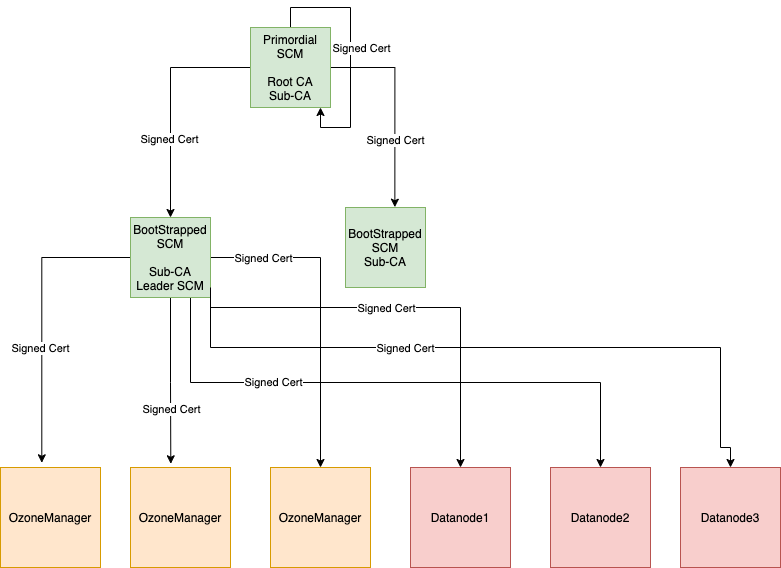
In a secure SCM HA cluster on the SCM where we perform init, we call this SCM as a primordial SCM. Primordial SCM starts root-CA with self-signed certificates and is used to issue a signed certificate to itself and other bootstrapped SCM's. Only primordial SCM can issue signed certificates for other SCM's. So, primordial SCM has a special role in the SCM HA cluster, as it is the only one that can issue certificates to SCM's.
The primordial SCM takes a root-CA role, which signs all SCM instances with a sub-CA certificate. The sub-CA certificates are used by SCM to sign certificates for OM/Datanodes.
When bootstrapping a SCM, it gets a signed certificate from the primary SCM and starts sub-CA.
Sub-CA on the SCM's are used to issue signed certificates for OM/DN in the cluster. Only the leader SCM issues a certificate to OM/DN.
How to enable security
<property>
<name>ozone.security.enable</name>
<value>true</value>
</property>

<property>
<name>hdds.grpc.tls.enabled</name>
<value>true</value>
</property>
Above configs are needed in addition to normal SCM HA configuration.
Primordial SCM
Primordial SCM is determined from the config ozone.scm.primordial.node.id.
The value for this can be node id or hostname of the SCM. If the config is
not defined, the node where init is run is considered as the primordial SCM.
bin/ozone scm --init
This will set up a public,private key pair and self-signed certificate for root CA and also generate public, private key pair and CSR to get a signed certificate for sub-CA from root CA.
Bootstrap SCM
bin/ozone scm --bootstrap
This will set up a public, private key pair for sub CA and generate CSR to get a signed certificate for sub-CA from root CA.
Note: Make sure to run --init only on one of the SCM host if primordial SCM is not defined. Bring up other SCM's using --bootstrap.
Current SCM HA Security limitation
- Unsecure HA cluster upgrade to secure HA cluster is not supported.
Implementation details
SCM HA uses Apache Ratis to replicate state between the members of the SCM HA quorum. Each node maintains the block management metadata in local RocksDB.
This replication process is a simpler version of OM HA replication process as it doesn't use any double buffer (as the overall db thourghput of SCM requests are lower)
Datanodes are sending all the reports (Container reports, Pipeline reports...) to all SCM nodes in parallel. Only the leader node can assign/create new containers, and only the leader node sends commands back to the Datanodes.
Verify SCM HA setup
After starting an SCM-HA it can be validated if the SCM nodes are forming one single quorum instead of 3 individual SCM nodes.
First, check if all the SCM nodes store the same ClusterId metadata:
cat /data/metadata/scm/current/VERSION
ClusterId is included in the VERSION file and should be the same in all the SCM nodes:
#Tue Mar 16 10:19:33 UTC 2021
cTime=1615889973116
clusterID=CID-130fb246-1717-4313-9b62-9ddfe1bcb2e7
nodeType=SCM
scmUuid=e6877ce5-56cd-4f0b-ad60-4c8ef9000882
layoutVersion=0
You can also create data and double check with ozone debug tool if all the container metadata is replicated.
bin/ozone freon randomkeys --numOfVolumes=1 --numOfBuckets=1 --numOfKeys=10000 --keySize=524288 --replicationType=RATIS --numOfThreads=8 --factor=THREE --bufferSize=1048576


# use debug ldb to check scm.db on all the machines
bin/ozone debug ldb --db=/tmp/metadata/scm.db ls


bin/ozone debug ldb --db=/tmp/metadata/scm.db scan --column-family=containers
Migrating from Non-HA to HA SCM
Add additional SCM nodes and extend the cluster configuration to reflect the newly added nodes.
Bootstrap the newly added SCM nodes with scm --bootstrap command and start the SCM service.
Note: Make sure that the ozone.scm.primordial.node.id property is pointed to the existing SCM before you run the bootstrap command on the newly added SCM nodes.