Ozone Deployment Architectures
This document outlines different Ozone deployment architectures, from single-cluster setups to multi-cluster and federated configurations. It also provides the necessary client and service configurations for these advanced setups.
The following figure illustrates the four primary deployment architectures for Ozone. Each is described in more detail in the sections below.
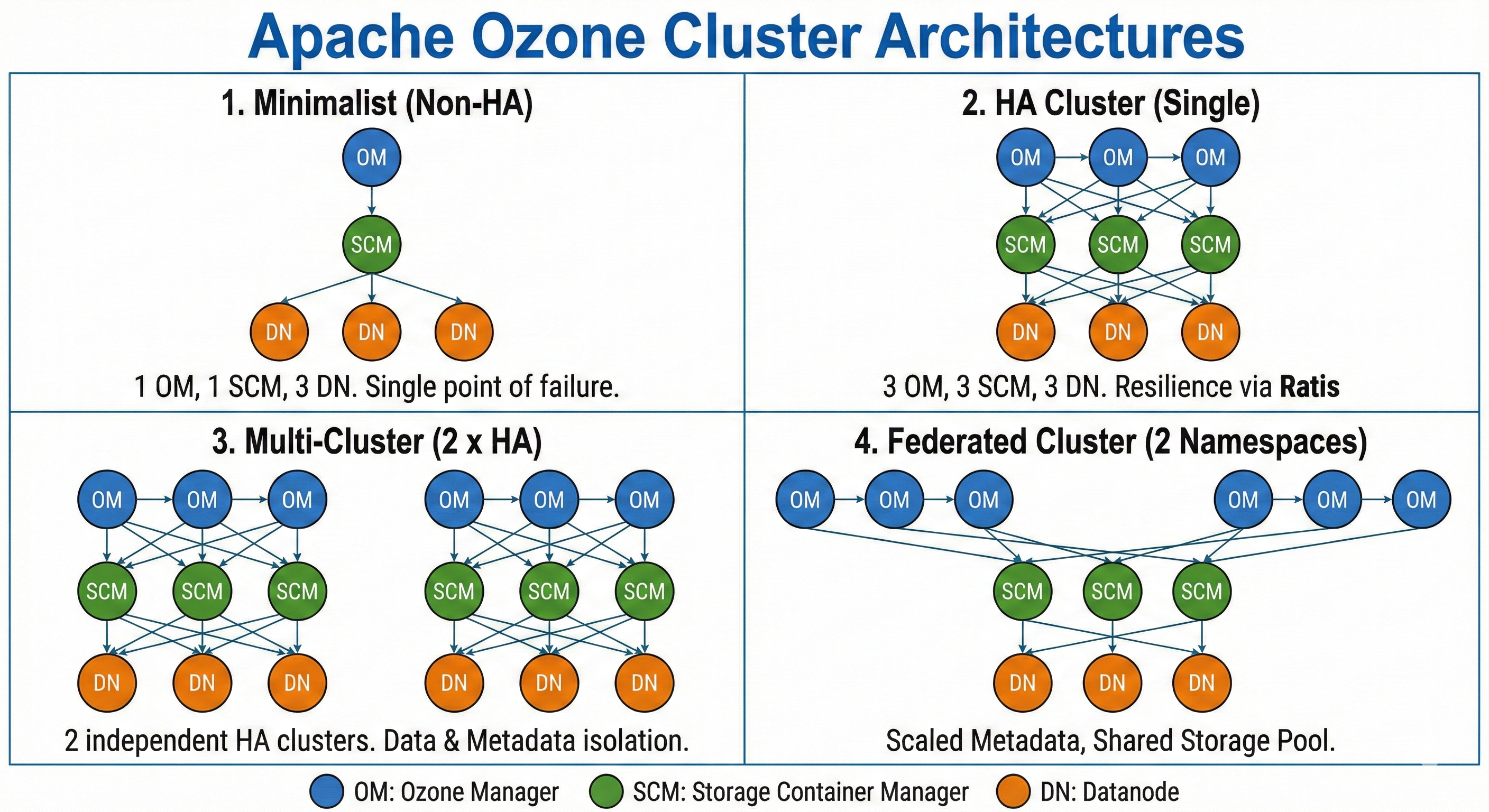
1. Minimalist (Non-HA)
- 1 Ozone Manager (OM)
- 1 Storage Container Manager (SCM)
- 3 Datanodes (DNs)
- Topology: Single cluster, no high availability.
- Use Case: Recommended for local testing, development, or small-scale, non-critical environments.
- Example: docker-compose.yaml
2. HA Cluster
- 3 Ozone Managers (OMs)
- 3 Storage Container Managers (SCMs)
- 3+ Datanodes (DNs)
- Topology: Single cluster, highly available.
- Use Case: The standard architecture for most production deployments, providing resilience against single-point-of-failure.
- Example: docker-compose.yaml for HA
3. Multi-Cluster
- Topology: Two or more completely separate HA clusters. Each cluster has its own set of OMs, SCMs, and DNs.
- Use Case: Provides full physical and logical isolation between clusters, ideal for separating different environments (e.g., dev and prod) or different user groups with distinct storage and control planes.
Multi-Cluster Client Configuration
For a client to interact with multiple distinct clusters, its configuration must specify the service IDs for each Ozone Manager service.
The following properties are set in the client's ozone-site.xml:
  <property>
    <name>ozone.om.service.ids</name>
    <value>ozone1,ozone2</value>
    <tag>OM, HA</tag>
    <description>
      A comma-separated list of all OM service IDs the client may need to
      contact. This allows the client to locate different Ozone clusters.
    </description>
  </property>
  <property>
    <name>ozone.om.internal.service.id</name>
    <value>ozone1</value>
    <tag>OM, HA</tag>
    <description>
      The default OM service ID for this client. If not specified, the client
      may need to explicitly reference a service ID for operations.
    </description>
  </property>
With this configuration, the client is aware of two clusters, ozone1 and ozone2, and will use ozone1 by default.
To direct a CLI command to a specific cluster, use the appropriate service ID parameter.
Example (SCM): List SCM roles for a specific SCM service.
ozone admin scm roles --service-id=<scm_service_id>
Example (OM): List OM roles for a specific OM service.
ozone admin om roles -id=<om_service_id>
Application Job Configuration (e.g., Spark)
When running application jobs, such as Spark, in a multi-cluster environment, additional parameters are required to access remote Ozone clusters.
To run a Spark shell job that accesses a remote cluster (e.g., ozone2), you must specify the filesystem path in the spark.yarn.access.hadoopFileSystems property:
spark-shell
  --conf "spark.yarn.access.hadoopFileSystems=ofs://ozone2"
In a Kerberos-enabled environment, YARN might incorrectly try to manage delegation tokens for the remote Ozone filesystem, causing jobs to fail with a token renewal error.
# Example token renewal error
24/02/08 01:24:30 ERROR repl.Main: Failed to initialize Spark session.
org.apache.hadoop.yarn.exceptions.YarnException: Failed to submit application_1707350431298_0007 to YARN : Failed to renew token: ...
To prevent this, you must tell YARN to exclude the remote filesystem from its token renewal process. A complete Spark shell command for accessing a remote, Kerberized cluster would include both properties:
spark-shell
  --conf "spark.yarn.access.hadoopFileSystems=ofs://ozone2"
  --conf "spark.yarn.kerberos.renewal.excludeHadoopFileSystems=ofs://ozone2"
4. Federated Cluster
- Topology: Multiple OM services (managing distinct namespaces) share a single, common SCM service and a common pool of Datanodes.
- Use Case: Provides separation of metadata and authority at the namespace level while managing storage as a single, large-scale resource pool.
Federation Configuration
In a federated setup, all OMs and Datanodes must be configured to communicate with the same shared SCM service. This is achieved by setting the ozone.scm.service.ids property in the ozone-site.xml of each OM and Datanode.
  <property>
    <name>ozone.scm.service.ids</name>
    <value>scm-federation</value>
    <tag>OZONE, SCM, HA</tag>
    <description>
      A comma-separated list of SCM service IDs. In a federated cluster,
      this should point all OMs and Datanodes to the same SCM service
      to enable the shared storage pool.
    </description>
  </property>