Implementation of Delete Operations
A common question is: after a user deletes something, when is space actually reclaimed? Ozone spreads work across the client, Ozone Manager (OM), Storage Container Manager (SCM), and Datanodes. This page is a single map of that pipeline: metadata moves first, then blocks are deleted asynchronously, and bytes on disk disappear only after Datanodes finish their background cleanup.
Client: CLI, FileSystem, and trash
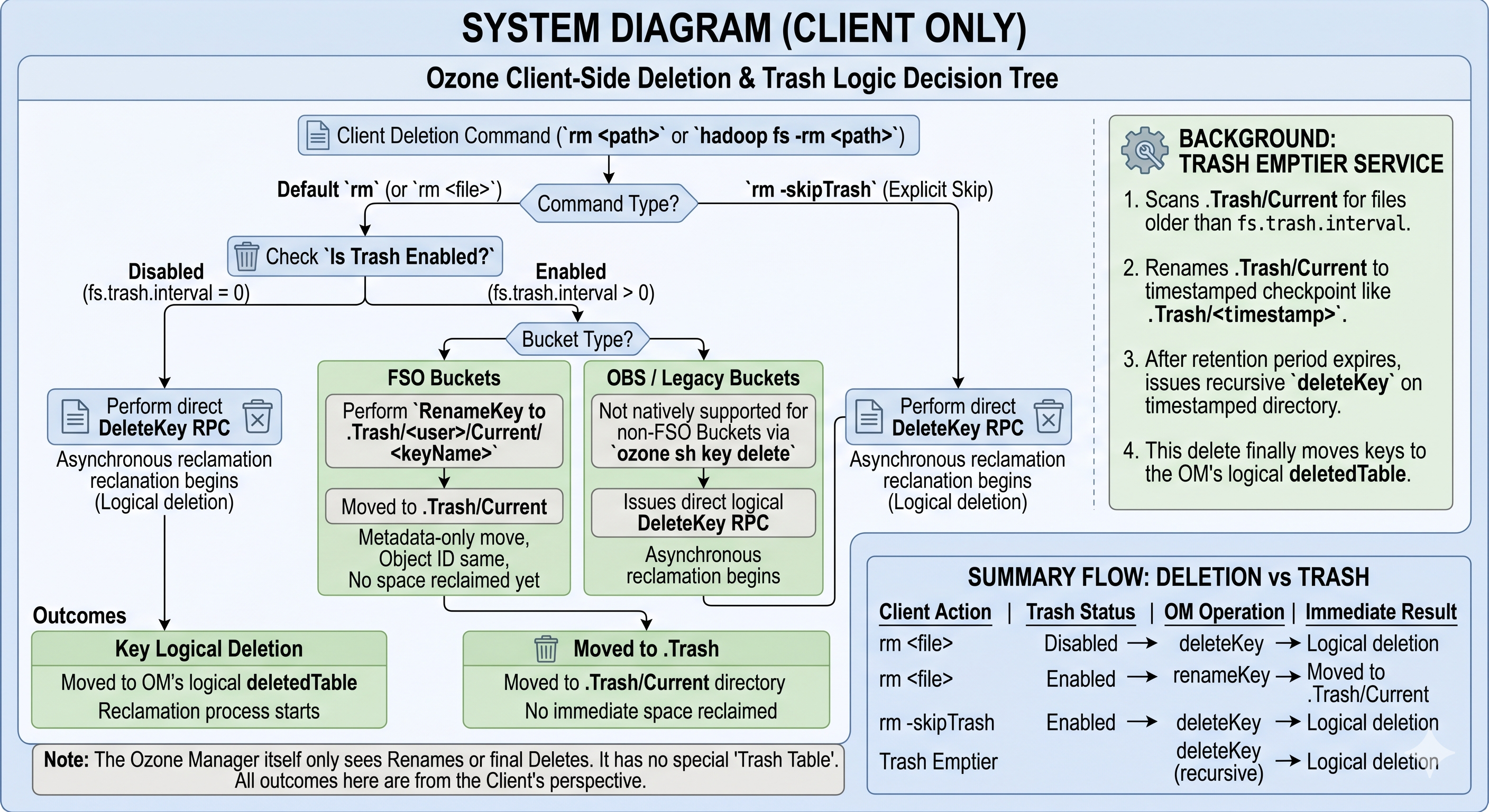
Deletion depends on which API you use and on bucket layout. Trash is implemented on the client (renames into .Trash), not as a separate table inside OM.
Ozone CLI (DeleteKeyHandler)
- FSO buckets
- If trash is enabled (
fs.trash.interval > 0), the CLI renames the key into the Hadoop trash layout:.Trash, a per-user segment,Current, then the key’s relative path. - If trash is disabled, it calls
bucket.deleteKey(keyName)for a direct delete.
- If trash is enabled (
- OBS / legacy buckets
ozone sh key deletecallsbucket.deleteKey(keyName)directly. Trash is not supported for this path the way it is for FSO.
Hadoop FileSystem (o3fs://, ofs://)
hadoop fs -rm follows the usual Hadoop TrashPolicy:
- With trash enabled, the client issues a rename from the source path to
/.Trash/Current/.... - With
-skipTrashor trash disabled, it callsFileSystem.delete(), which becomes adeleteKeyRPC to OM.
What OM sees for trash vs delete
- Rename into
.Trashis a normal metadata rename inkeyTableorfileTable. The object id and blocks stay put; no space is reclaimed. deleteKeyremoves the key from the live namespace and stages it for asynchronous block cleanup (see OM below).
Trash emptier
.Trash is an ordinary directory tree. A Trash emptier (Hadoop client background thread or scheduled job) eventually:
- Renames
.Trash/Currentto a timestamped checkpoint under.Trash/. - After retention, issues a recursive delete on that checkpoint.
- Those
deleteKeyoperations finally move keys intodeletedTableand start physical reclamation.
Client summary
| Client action | Trash | OM operation | Result |
|---|---|---|---|
rm file | Off | deleteKey | Entry moves toward deletedTable; async reclamation begins |
rm file | On | renameKey | Data under .Trash/Current; no reclamation yet |
rm -skipTrash | On | deleteKey | Same as direct delete |
| Trash emptier | — | deleteKey (recursive) | Keys reach deletedTable; space can be reclaimed |
Takeaway: OM has no trash table. It only sees renames or final deletes.
Ozone Manager: tables and background services
Deletion in OM is multi-phase and asynchronous so large trees and huge key counts do not block a single RPC.
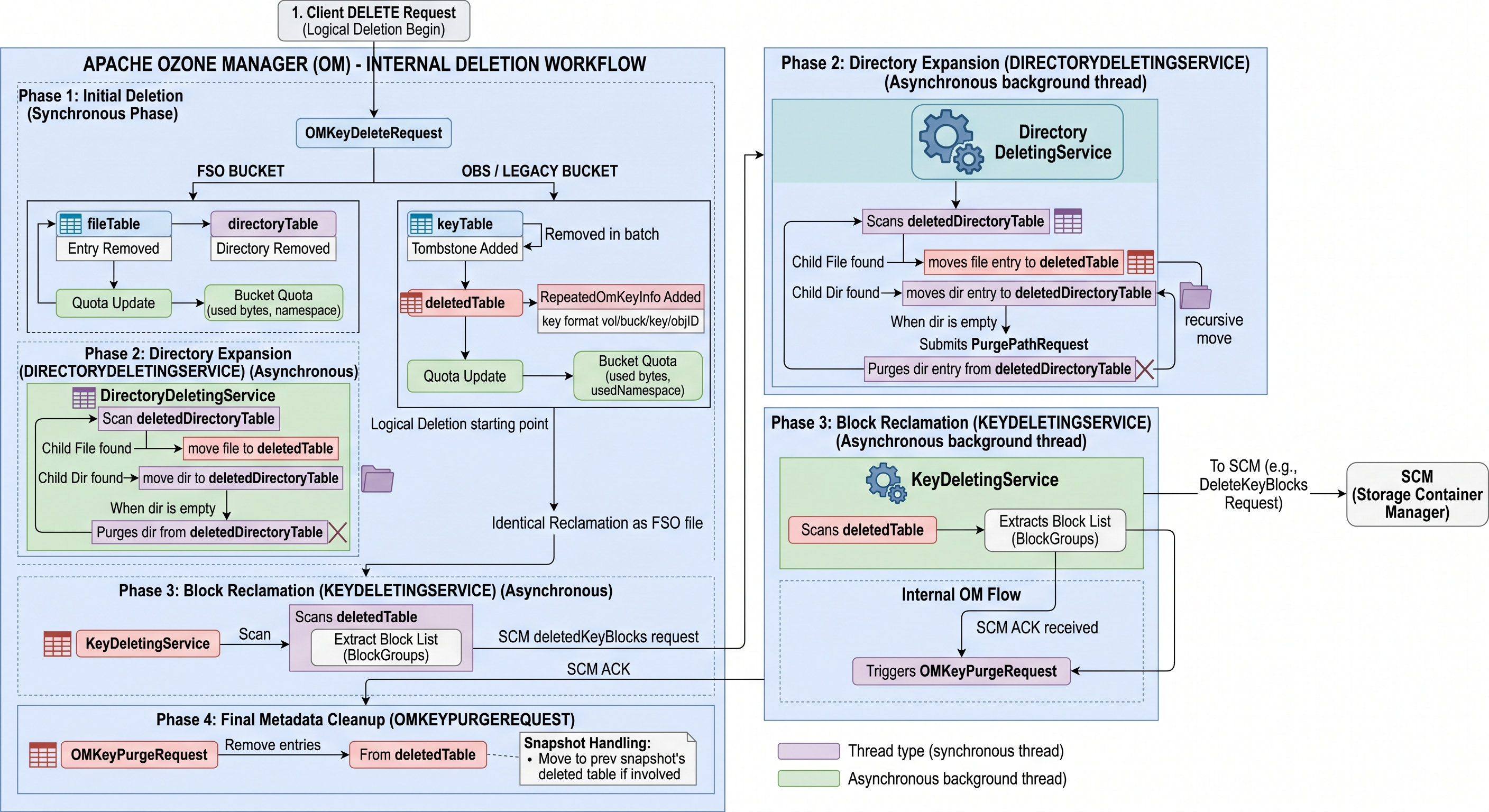
Synchronous delete (OMKeyDeleteRequest)
When deleteKey is processed:
- File (FSO): Row leaves
fileTable(orkeyTablein non-FSO layouts) and is recorded indeletedTable. - Directory (FSO): Row moves from
directoryTabletodeletedDirectoryTable. - Quota: Bucket used bytes and namespace usage are updated for the logical delete at this stage; retained usage stays in quota totals until
OMKeyPurgeRequestclears it (quota internals).
Directory expansion (DirectoryDeletingService) — FSO
Deleting a directory does not instantly move every descendant. The service:
- Scans
deletedDirectoryTablefor pending directory deletes. - Moves child files from
fileTable→deletedTableand child directories fromdirectoryTable→deletedDirectoryTablefor later iterations. - When a directory has no remaining children in the live tables, it sends
PurgePathRequestto drop that directory fromdeletedDirectoryTable.
Block handoff and purge (KeyDeletingService, OMKeyPurgeRequest)
KeyDeletingService drains deletedTable:
- Reads block groups for each deleted key.
- Asks SCM to persist delete-block intent and waits for acknowledgement that SCM has recorded it.
- Submits
OMKeyPurgeRequestto remove metadata fromdeletedTableonce SCM has accepted the work.
OMKeyPurgeRequest is the terminal metadata step for a key. With snapshots, purge may retain or redirect entries (for example toward a snapshot’s deleted tables) so snapshot chains stay consistent—details depend on snapshot configuration and chain state.
OM table flow (FSO)
| Step | Entity | From | To | Handler / service |
|---|---|---|---|---|
| 1 | File | fileTable | deletedTable | OMKeyDeleteRequest |
| 1 | Directory | directoryTable | deletedDirectoryTable | OMKeyDeleteRequest |
| 2 | Child file | fileTable | deletedTable | DirectoryDeletingService |
| 2 | Child dir | directoryTable | deletedDirectoryTable | DirectoryDeletingService |
| 3 | File metadata | deletedTable | removed | KeyDeletingService → OMKeyPurgeRequest |
| 4 | Directory metadata | deletedDirectoryTable | removed | DirectoryDeletingService → PurgePathRequest |
Interaction with Ozone Snapshots
When Ozone Snapshots are enabled on a bucket, the deletion process differs to guarantee that historical snapshot read integrity is preserved and blocks are only reclaimed when no longer referenced.
1. Deleted Key Partitioning (Snapshot Creation)
To prevent double-counting and key duplication across databases, deleted keys are cleanly partitioned during snapshot creation:
- DB Checkpoint: When a snapshot is taken, the active DB is checkpointed to create a frozen, read-only snapshot DB. At this point, the snapshot DB's
deletedTableanddeletedDirTablecontain all keys that were deleted in the active namespace prior to the snapshot's creation. - Active DB Purge: Immediately following checkpoint creation, the active DB transaction deletes all keys matching the bucket's prefix from the active DB's
deletedTableanddeletedDirTable. - Partition Effect:
- Keys deleted before snapshot creation reside only in the snapshot DB's deleted tables.
- Keys deleted after snapshot creation reside only in the active DB's deleted tables.
- Consequently, a specific deleted key (identified by its path and unique
objectId) resides in at most one deleted table at any time.
2. Reclaimable Key Filtering
The KeyDeletingService runs background tasks against both the active DB and the snapshot DBs. To determine if a deleted key's block space can be safely reclaimed, it uses a ReclaimableKeyFilter:
- When scanning a
deletedTableentry in snapshotS_n, the filter checks if the key exists in thekeyTableorfileTableof the previous snapshotS_{n-1}in the bucket's snapshot chain. - If the key is present in
S_{n-1}, it means the key is still referenced by an older snapshot. The key is not reclaimable and remains in thedeletedTable. - If the key is not referenced by any older snapshot, the filter marks it reclaimable. The block delete commands are registered with SCM, and an
OMKeyPurgeRequestremoves the metadata entry.
3. Snapshot Reclamation (Snapshot Deletion)
When a snapshot is deleted, its keys must be reconciled with the rest of the chain:
- The Snapshot Deleting Service (
SDS) executes anOMSnapshotMoveDeletedKeysRequest. - It scans the deleted snapshot's local
deletedTable. - Any keys that are still referenced by the next snapshot in the chain are moved from the deleted snapshot's
deletedTableto the next snapshot'sdeletedTable. - If there is no next snapshot, the keys are moved back to the active DB's
deletedTable. - This ensures that as snapshots are deleted, block deletion intent is safely passed forward until the blocks are no longer protected by any snapshot.
4. Quota Accounting for Snapshots
- When a key is logically deleted, if snapshots exist, its size is subtracted from
usedBytesand added tosnapshotUsedBytes(the pending deletion bucket). - When a key is permanently reclaimed (via
KeyDeletingServiceor snapshot delete),purgeSnapshotUsedBytesis called to decrement thesnapshotUsedBytesmetric.
OBS and LEGACY buckets
OBS / legacy layouts use a flat key namespace (paths with slashes are still one key). There is no directory tree in directoryTable, so there is no DirectoryDeletingService expansion step.
OMKeyDeleteRequestworks againstkeyTable(BucketLayout.OBJECT_STORE/ legacy equivalents). A tombstone may be visible in cache while the transaction completes; quota updates apply with the delete.OMKeyDeleteResponsepersists: delete fromkeyTable, insert intodeletedTable(often keyed likevolume/bucket/keyName/objectId). “Directories” in the name are string prefixes, not rows indirectoryTable.- From
deletedTableonward,KeyDeletingService, SCM, and Datanodes behave like FSO file deletes.
| FSO | OBS / LEGACY | |
|---|---|---|
| Live tables | fileTable, directoryTable | keyTable |
| Directory staging | deletedDirectoryTable | — |
| Deleted keys | deletedTable | deletedTable |
| Directory expansion | Yes (DirectoryDeletingService) | No |
Physical reclamation: SCM and Datanodes
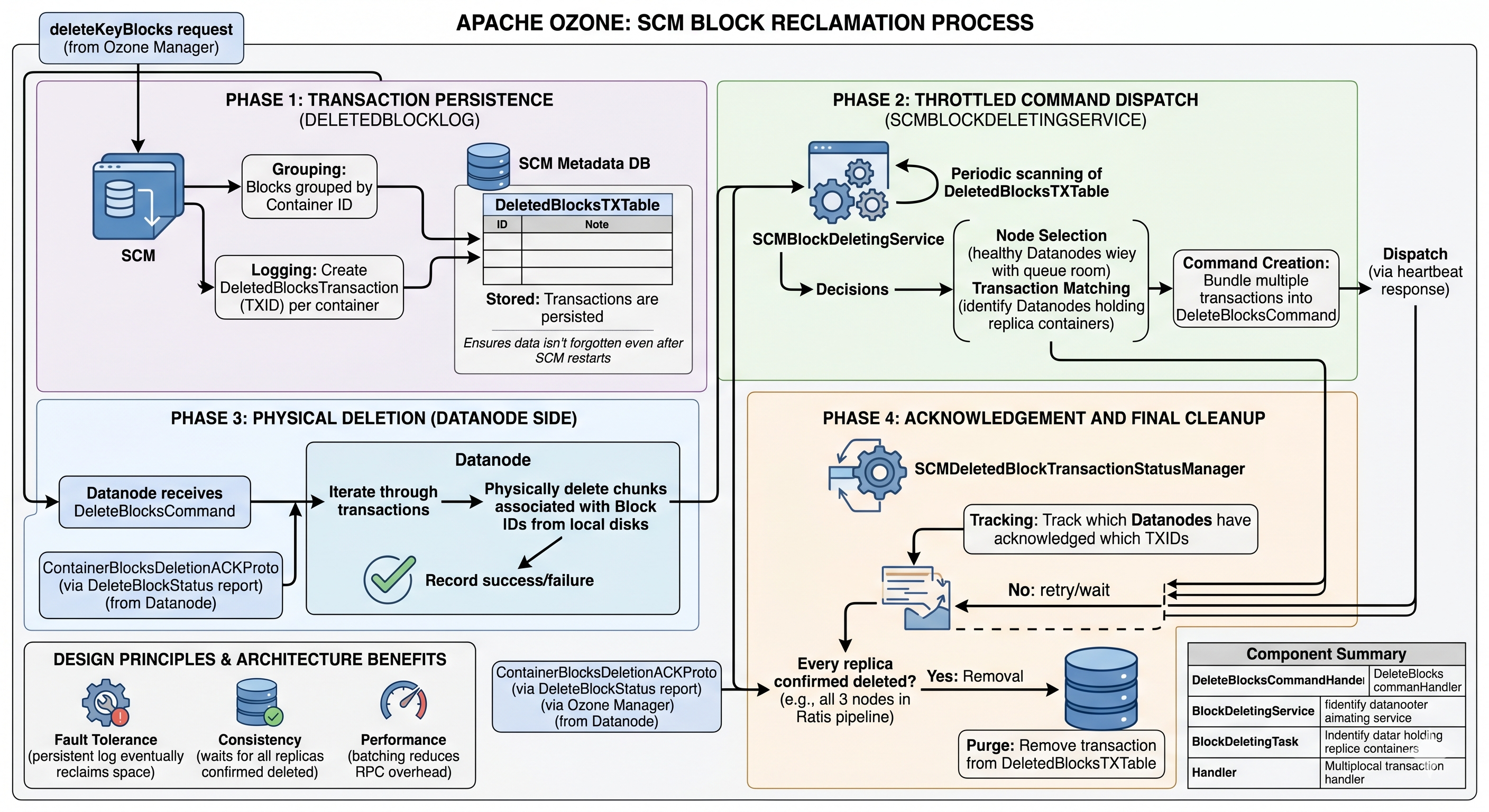
OM never deletes bytes on disk directly. It hands block ids to SCM, which coordinates replicas on Datanodes.
SCM: log, throttle, dispatch
- Persist intent: On
deleteKeyBlocksfrom OM, SCM groups blocks by container, createsDeletedBlocksTransactionrecords with transaction ids (TXIDs), and stores them inDeletedBlocksTXTable(RocksDB in SCM). A restart replays this log—work is not forgotten. SCMBlockDeletingService: Periodically scans pending transactions, respects healthy Datanodes and queue limits, buildsDeleteBlocksCommandpayloads (often batched), and attaches them to heartbeat responses.- Completion: Datanodes report
ContainerBlocksDeletionACKProto/ delete-block status.SCMDeletedBlockTransactionStatusManagertracks which replicas acknowledged which TXID. SCM removes a transaction fromDeletedBlocksTXTableonly after all required replicas have acknowledged.
This design favors eventual completion under failures, no orphan replicas left behind, and fewer RPCs via batching.
Datanode: ACK first, erase in the background
DeleteBlocksCommandHandler: Commands go ondeleteCommandQueues;DeleteCmdWorkerrunsProcessTransactionTaskper TX. The handler records deletion intent in the container DB—schema v2/v3: transactions inDeletedBlocksTXTableinside the container DB; schema v1: block keys move to adeletedBlocksTable/ deleting prefix. It then ACKs SCM so the control plane can track replica progress.BlockDeletingService: A background loop schedulesBlockDeletingTaskper container, callshandler.deleteBlock()to remove chunk files from disk, then cleans DB state (block rows, transaction rows,usedBytes, pending-delete counters). Empty containers can be marked so SCM may retire the container later.
| Piece | Role |
|---|---|
DeleteBlocksCommandHandler | Apply SCM command, persist intent in container DB, send ACK |
BlockDeletingService | Throttled physical deletes and DB cleanup |
BlockDeletingTask | Per-container work unit; uses the container handler (e.g. key-value) |
Net effect: SCM and OM do not wait for slow disks before moving their own state forward; Datanodes guarantee eventual removal or keep retrying until the cluster agrees every replica is gone.
See also
- RocksDB in Ozone — OM, SCM, and Datanode RocksDB usage, including tables such as
fileTableanddeletedTable. - Datanode container schema (RocksDB) — per-container metadata layout on the Datanode.
- Trash — operations-focused trash behavior.