DiskBalancer
Overview
Apache Ozone works well to distribute all containers evenly across all multiple disks on each Datanode. This initial spread ensures that I/O load is balanced from the start. However, over the operational lifetime of a cluster disk imbalance can occur due to the following reasons:
- Adding new disks to expand datanode storage space.
- Replacing old broken disks with new disks.
- Massive block or replica deletions.
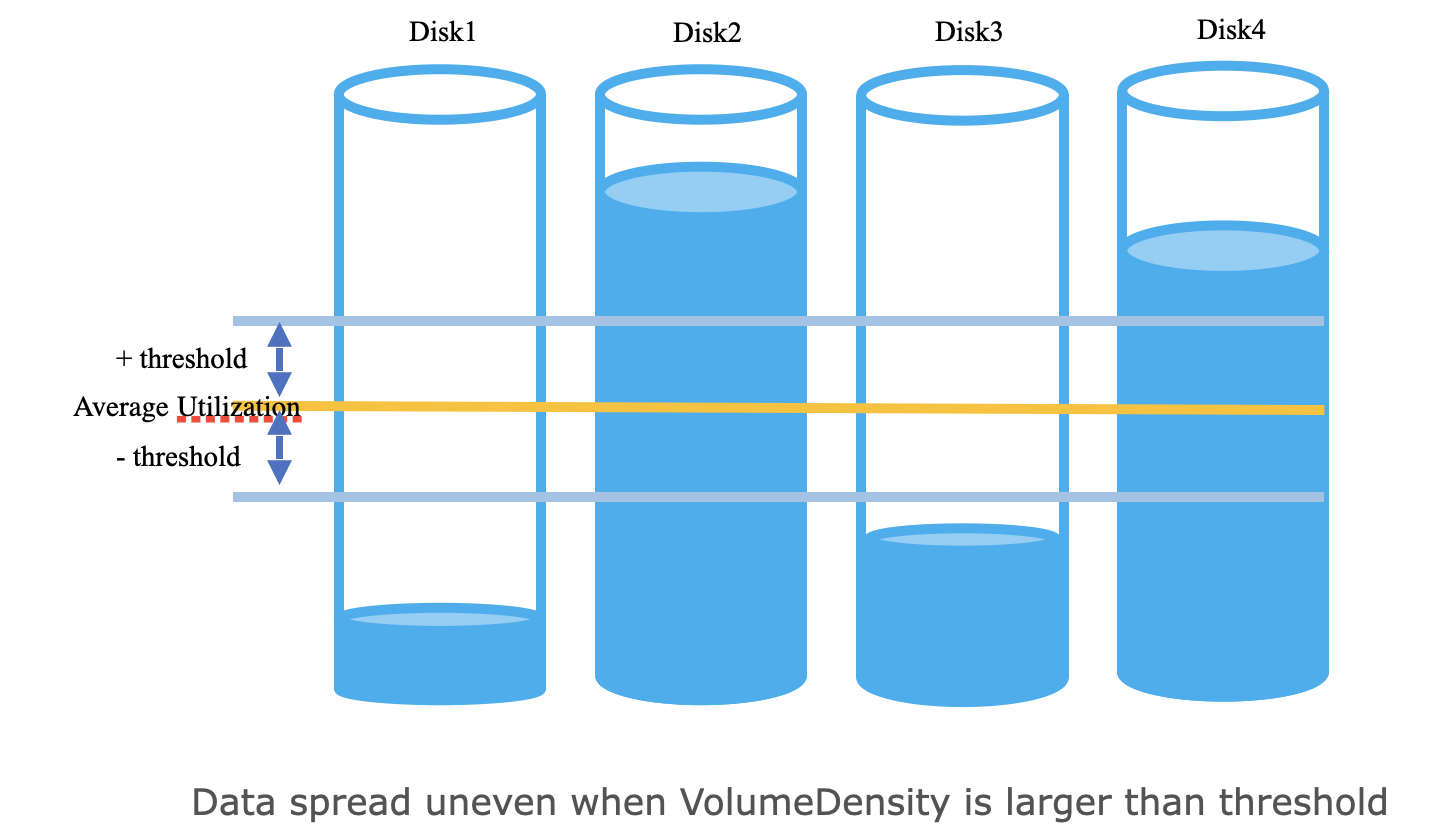
This uneven utilisation of disks can create performance bottlenecks, as over-utilised disks become hotspots limiting the overall throughput of the Datanode. As a result, this new feature, DiskBalancer, is introduced to ensure even data distribution across disks within a Datanode.
A disk is considered a candidate for balancing if its
VolumeDataDensity exceeds a configurable threshold. DiskBalancer can be triggered manually by CLI commands.
Feature Flag
The Disk Balancer feature is introduced with a feature flag. By default, this feature is disabled.
The feature can be enabled by setting the following property to true in the ozone-site.xml configuration file:
hdds.datanode.disk.balancer.enabled = false
Authentication and Authorization
DiskBalancer commands communicate directly with datanodes via RPC, requiring proper authentication and authorization configuration.
Authentication Configuration
In secure clusters with Kerberos enabled, the datanode must have its Kerberos principal configured for RPC authentication in ozone-site.xml:
<property>
  <name>hdds.datanode.kerberos.principal</name>
  <value>dn/_HOST@REALM.TLD</value>
  <description>
    The Datanode service principal. This is typically set to
    dn/_HOST@REALM.TLD. Each Datanode will substitute _HOST with its
    own fully qualified hostname at startup. The _HOST placeholder
    allows using the same configuration setting on all Datanodes.
  </description>
</property>
Note: Without this configuration, DiskBalancer commands will fail with authentication errors in secure clusters. The client uses this principal to verify the datanode’s identity when establishing RPC connections.
Authorization Configuration
Each datanode performs authorization checks using OzoneAdmins based on the ozone.administrators configuration:
- Admin operations (start, stop, update): Require the user to be in
ozone.administratorsor belong to a group inozone.administrators.groups - Read-only operations (status, report): Do not require admin privileges - any authenticated user can query status and reports
Default Behavior
By default, if ozone.administrators is not configured, only the user who launched the datanode service can start, stop,
or update DiskBalancer. This means that in a typical deployment where the datanode runs as user dn, only that user has
admin privileges for DiskBalancer operations.
Enabling Authorization for Additional Users
To allow other users to perform DiskBalancer admin operations (start, stop, update), configure the ozone.administrators property in ozone-site.xml:
Example 1: Single user
<property>
  <name>ozone.administrators</name>
  <value>scm</value>
</property>
Example 2: Multiple users
<property>
  <name>ozone.administrators</name>
  <value>scm,hdfs</value>
</property>
Example 3: Using groups
<property>
  <name>ozone.administrators.groups</name>
  <value>ozone-admins,cluster-operators</value>
</property>
Note: ozone-admins and cluster-operators are example group names. Replace them with actual
group names from your environment. After updating the ozone.administrators configuration,
restart the datanode service for the changes to take effect.
Command Line Usage
The DiskBalancer is managed through the ozone admin datanode diskbalancer command.
Note: This command is hidden from the main help message (ozone admin datanode --help). This is because the feature
is currently considered experimental and is disabled by default. The command is, however, fully functional for those who wish to enable and use the feature.
Command Syntax
Start DiskBalancer:
ozone admin datanode diskbalancer start [<datanode-address> ...] [OPTIONS] [--in-service-datanodes]
Stop DiskBalancer:
ozone admin datanode diskbalancer stop [<datanode-address> ...] [--in-service-datanodes]
Update Configuration:
ozone admin datanode diskbalancer update [<datanode-address> ...] [OPTIONS] [--in-service-datanodes]
Get Status:
ozone admin datanode diskbalancer status [<datanode-address> ...] [--in-service-datanodes] [--json]
Get Report:
ozone admin datanode diskbalancer report [<datanode-address> ...] [--in-service-datanodes] [--json]
Command Options
| Option | Description | Example |
|---|---|---|
<datanode-address> |
One or more datanode addresses as positional arguments. Addresses can be: - Hostname (e.g., DN-1) - uses default CLIENT_RPC port (19864)- Hostname with port (e.g., DN-1:19864)- IP address (e.g., 192.168.1.10)- IP address with port (e.g., 192.168.1.10:19864)- Stdin ( -) - reads datanode addresses from standard input, one per line |
DN-1DN-1:19864192.168.1.10- |
--in-service-datanodes |
It queries SCM for all IN_SERVICE datanodes and executes the command on all of them. | --in-service-datanodes |
--json |
Format output as JSON. | --json |
-t/--threshold-percentage |
Volume density threshold percentage (default: 10.0). Used with start and update commands. |
-t 5--threshold-percentage 5.0 |
-b/--bandwidth-in-mb |
Maximum disk bandwidth in MB/s (default: 10). Used with start and update commands. |
-b 20--bandwidth-in-mb 50 |
-p/--parallel-thread |
Number of parallel threads (default: 1). Used with start and update commands. |
-p 5--parallel-thread 10 |
-s/--stop-after-disk-even |
Stop automatically after disks are balanced (default: true). Used with start and update commands. |
-s false--stop-after-disk-even true |
Examples
Start DiskBalancer:
# Start DiskBalancer on multiple datanodes
ozone admin datanode diskbalancer start DN-1 DN-2 DN-3

# Start DiskBalancer on all IN_SERVICE datanodes
ozone admin datanode diskbalancer start --in-service-datanodes

# Start DiskBalancer with configuration parameters
ozone admin datanode diskbalancer start DN-1 -t 5 -b 20 -p 5
# Or using the long form:
ozone admin datanode diskbalancer start DN-1 --threshold-percentage 5 -b 20 -p 5

# Read datanode addresses from stdin
echo -e "DN-1\nDN-2" | ozone admin datanode diskbalancer start -

# Start DiskBalancer with json output
ozone admin datanode diskbalancer start DN-1 --json
Stop DiskBalancer:
# Stop DiskBalancer on multiple datanodes
ozone admin datanode diskbalancer stop DN-1 DN-2 DN-3

# Stop DiskBalancer on all IN_SERVICE datanodes
ozone admin datanode diskbalancer stop --in-service-datanodes

# Stop DiskBalancer with json output
ozone admin datanode diskbalancer stop DN-1 --json
Update Configuration:
# Update multiple parameters
ozone admin datanode diskbalancer update DN-1 -t 5 -b 50 -p 10

# Update on all IN_SERVICE datanodes
ozone admin datanode diskbalancer update --in-service-datanodes -t 5
# Or using the long form:
ozone admin datanode diskbalancer update --in-service-datanodes --threshold-percentage 5

# Update with json output
ozone admin datanode diskbalancer update DN-1 -b 50 --json
Get Status:
# Get status from multiple datanodes
ozone admin datanode diskbalancer status DN-1 DN-2 DN-3

# Get status from all IN_SERVICE datanodes
ozone admin datanode diskbalancer status --in-service-datanodes

# Get status as JSON
ozone admin datanode diskbalancer status --in-service-datanodes --json
Get Report:
# Get report from multiple datanodes
ozone admin datanode diskbalancer report DN-1 DN-2 DN-3

# Get report from all IN_SERVICE datanodes
ozone admin datanode diskbalancer report --in-service-datanodes

# Get report as JSON
ozone admin datanode diskbalancer report --in-service-datanodes --json
DiskBalancer Configurations
The DiskBalancer’s behavior can be controlled using the following configuration properties in ozone-site.xml.
| Property | Default Value | Description |
|---|---|---|
hdds.datanode.disk.balancer.enabled |
false |
If false, the DiskBalancer service on the Datanode is disabled. Configure it to true for diskBalancer to be enabled. |
hdds.datanode.disk.balancer.volume.density.threshold.percent |
10.0 |
A percentage (0-100). A datanode is considered balanced if for each volume, its utilization differs from the average datanode utilization by no more than this threshold. |
hdds.datanode.disk.balancer.max.disk.throughputInMBPerSec |
10 |
The maximum bandwidth (in MB/s) that the balancer can use for moving data, to avoid impacting client I/O. |
hdds.datanode.disk.balancer.parallel.thread |
5 |
The number of worker threads to use for moving containers in parallel. |
hdds.datanode.disk.balancer.service.interval |
60s |
The time interval at which the Datanode DiskBalancer service checks for imbalance and updates its configuration. |
hdds.datanode.disk.balancer.stop.after.disk.even |
true |
If true, the DiskBalancer will automatically stop its balancing activity once disks are considered balanced (i.e., all volume densities are within the threshold). |
hdds.datanode.disk.balancer.volume.choosing.policy |
org.apache.hadoop.ozone.container.diskbalancer.policy.DefaultVolumeChoosingPolicy |
The policy class for selecting source and destination volumes for balancing. |
hdds.datanode.disk.balancer.container.choosing.policy |
org.apache.hadoop.ozone.container.diskbalancer.policy.DefaultContainerChoosingPolicy |
The policy class for selecting which containers to move from a source volume to destination volume. |
hdds.datanode.disk.balancer.service.timeout |
300s |
Timeout for the Datanode DiskBalancer service operations. |
hdds.datanode.disk.balancer.should.run.default |
false |
If the balancer fails to read its persisted configuration, this value determines if the service should run by default. |