Distributed tracing
Distributed tracing can help to understand performance bottleneck with visualizing end-to-end performance. Ozone makes use of OpenTelemetry API for tracing and uses OTLP with gRPC format for sending traces. jaeger tracing library as collector can collect traces from Ozone over default port 4317 (as default).
Enabling Tracing
Tracing is turned off by default. To enable it across Ozone services, configure the following property in ozone-site.xml:
<property>
   <name>ozone.tracing.enabled</name>
   <value>true</value>
</property>
Application-Aware Client Tracing
Application-aware tracing lets Ozone participate in an existing application trace without starting its own
root traces when cluster-wide tracing is disabled. It applies only when ozone.tracing.enabled=false and parent context is passed.
This is controlled by:
<property>
   <name>ozone.tracing.client.application-aware</name>
   <value>true</value>
</property>
Default Value: true
Behavior:
- When
true, the Ozone client can create child spans if an application trace is already active (via the application's Global OpenTelemetry instance or a W3C-propagated context). Ozone will not start a new root trace on its own. - When
false(withozone.tracing.enabled=false), client tracing is fully off. - When
ozone.tracing.enabled=true, Ozone uses its own OpenTelemetry SDK and exports spans normally; application-aware mode does not change that behavior. - Set
ozone.tracing.endpointon the Ozone side to the same OTLP collector endpoint used by your application.
Note: For application-aware tracing in-process, the application must register its OpenTelemetry SDK with
GlobalOpenTelemetrybefore creating the Ozone client so Ozone can adopt it. If no global tracer is registered, Ozone initializes its own SDK and uses theozonetracer instead.
Configuration Priorities
When resolving configurations for endpoints and sampling strategies, Ozone evaluates sources in the following order of priority:
- Explicit Configuration Keys (defined in
ozone-site.xml) - Environment Variables
- Default Internal Values
Collector Endpoint Configuration
The endpoint specifies the destination where the Jaeger collector is listening.
Via ozone-site.xml
<property>
   <name>ozone.tracing.endpoint</name>
   <value>http://localhost:4317</value>
</property>
Via Environment Variable
You can also set this environment variable for each Ozone component (OM, SCM, Datanode) and the Ozone client:
export OTEL_EXPORTER_OTLP_ENDPOINT=http://localhost:4317
Default Value: http://localhost:4317 (if neither the configuration key nor the environment variable is provided).
Sampling Strategies
To minimize performance overhead, Ozone supports sampling at both the trace level and the span level.
1. Trace-Level Sampling
This controls the global percentage of end-to-end requests that will be tracked, accepting a ratio from 0.0 (0%) to 1.0 (100%).
Via ozone-site.xml
<property>
   <name>ozone.tracing.sampler</name>
   <value>0.01</value>
</property>
Via Environment Variable
export OTEL_TRACES_SAMPLER_ARG=0.01
Note: This configuration records 1% of total requests. If an invalid or negative value is provided, it defaults to
1.0(100%).
2. Span-Level Sampling
This allows you to set sampling for specific, high-interest operations. It accepts a comma-separated list of spanName:rate pairings.
The table below shows common span naming patterns with examples. Use the exact span name (case-sensitive) in your config. Client and server spans often use different names for the same operation.
| Pattern | Typical layer | Examples |
|---|---|---|
{Interface}.{method} | Client → OM/SCM | OzoneManagerClientProtocol.openKey, OzoneManagerClientProtocol.commitKey, ScmBlockLocationProtocol.allocateBlock |
{RequestType} | OM/SCM server | CreateKey, CommitKey, InfoVolume, AllocateScmBlock |
XceiverClient{Transport}.{CmdType} | Client → Datanode | XceiverClientRatis.WriteChunk, XceiverClientRatis.PutBlock, XceiverClientGrpc.WriteChunk |
{CmdType} | Datanode server | WriteChunk, PutBlock, ReadChunk |
{EndpointClass}.{method} | S3 Gateway | ObjectEndpoint.put, ObjectEndpoint.get |
ofs {operation} | Ozone FileSystem | ofs create, ofs open, ofs delete |
{command} {args...} | Shell / CLI | ozone sh key put vol1/buck1/key1 /path/to/file |
Via ozone-site.xml
<property>
   <name>ozone.tracing.span.sampling</name>
   <value>createVolume:1.0,getBucket:0.5</value>
</property>
Via Environment Variable
export OTEL_SPAN_SAMPLING_ARG="createVolume:1.0,getBucket:0.5"
Note: In this example, 100% of
createVolumespans and 50% ofgetBucketspans will be collected.
Instrumented Components
When tracing is enabled, specific services emit spans using the designated identifiers below. Trace context is propagated across service boundaries via gRPC and W3C context propagation.
| Service / Component | Service Name |
|---|---|
| Ozone Manager | OzoneManager |
| Storage Container Manager | StorageContainerManager |
| Datanode | HddsDatanodeService.{datanodeId} |
| S3 Gateway | S3gateway |
| Ozone Client | client (when Ozone initializes tracing in the JVM) |
| CLIs (Shell / FS / Freon) | shell, FsShell, freon |
Ozone uses the OpenTelemetry tracer name ozone by default for all components. The service.name
values in the table above are set at component initialization. OpenTelemetry defines OTEL_SERVICE_NAME
for configuring service.name, but Ozone does not support overriding service names through this
environment variable.
Note: If an application registers OpenTelemetry first, client spans are exported under that application's service name, not
client.
Dynamic Reconfiguration
You can update the following tracing properties at runtime on the OM, SCM, and Datanodes without restarting the processes:
ozone.tracing.enabledozone.tracing.endpointozone.tracing.samplerozone.tracing.span.samplingozone.tracing.client.application-aware
Note: S3 Gateway and the Ozone client do not support dynamic reconfiguration.
For more details on dynamic property reload, see Dynamic Property Reload.
Quick Start
-
Start your Ozone cluster and a Jaeger collector.
-
Enable tracing and set the collector endpoint to your Jaeger OTLP receiver. See Enabling Tracing and Collector Endpoint Configuration.
-
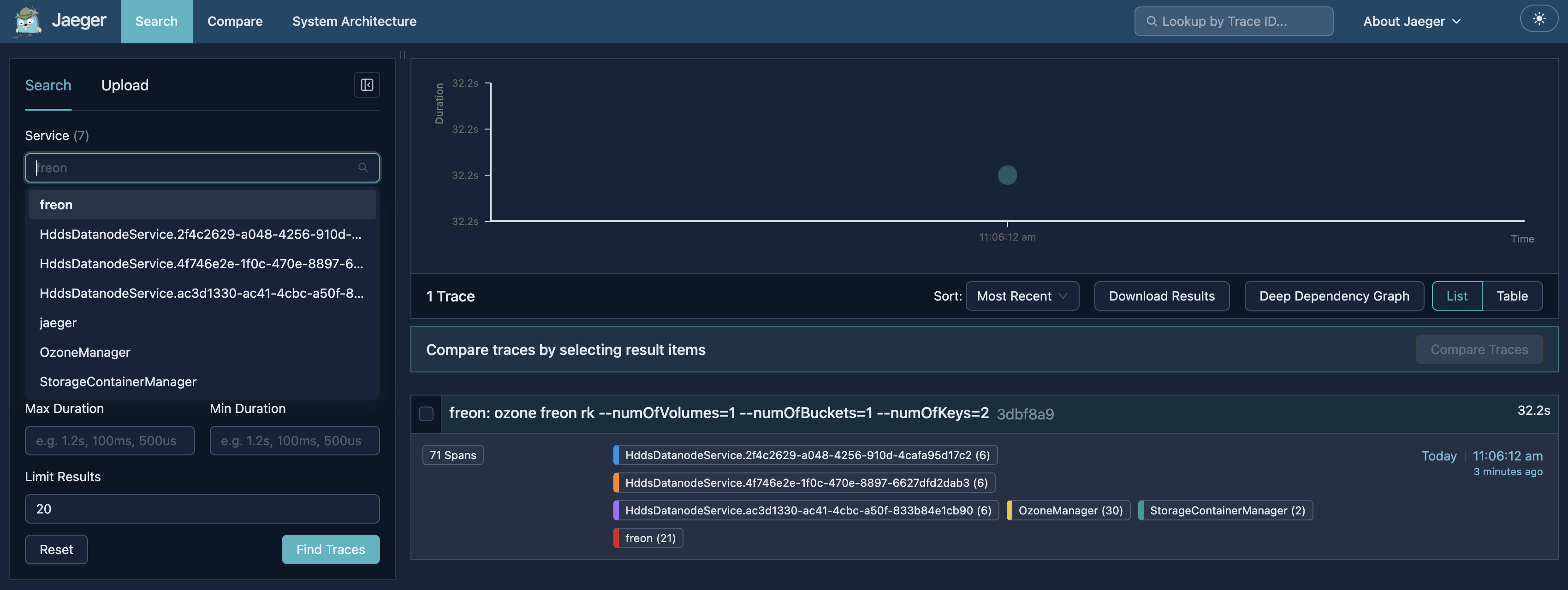
Generate sample traces:
ozone freon rk --numOfVolumes=1 --numOfBuckets=1 --numOfKeys=2 -
Open the Jaeger UI, select a service such as
OzoneManagerorfreon, and click Find Traces.
References
- Design doc: HDDS-13679 Distributed tracing improvement
- Jira: HDDS-13679