Recon AI Assistant
The Recon AI Assistant lets you ask questions about your Apache Ozone cluster in plain English and get answers assembled from the data Recon already collects. It is an optional, disabled by default, experimental feature of the Recon service.
Note: This page is for operators (who enable, secure, configure and run the assistant) and end users (who ask it questions). It is not a code walkthrough; contributors can find the internal flow in
CODE_FLOW.mdnext to the chatbot source.
1. Overview
Recon continuously derives a large amount of cluster metadata - container health and replica state, namespace and usage rollups, open and pending-delete keys, datanode and pipeline status, background task and sync state - and exposes it across many REST endpoints and UI screens. In practice most of that information is never seen or correlated, because you have to know which endpoint or screen holds the answer.
The assistant closes that gap: you ask a question, and it decides which Recon view(s) answer it, runs those reads, and writes back a readable summary.
What it is not:
- It is not a query engine that runs server-side aggregations across all cluster data - it
reports what individual Recon endpoints return. The
LLMmay reason over the data it receives (for example, count or compare items in a result set), but it does not issue cross-endpoint joins or scan unbounded datasets server-side. - It is read-only - it never mutates the cluster.
- Its results are bounded (at most 1000 records per read - see Limits).
- Its answers reflect Recon's last metadata sync, not the live cluster state.
Important: The assistant calls an external
LLMprovider, so cluster metadata leaves your network when it is used. Read Data sent to third-party providers before enabling it. The feature is marked Beta and may change between releases.
2. Architecture at a glance
At a high level a question flows through three steps:
- Tool selection - the assistant asks the
LLMwhich Recon view(s) can answer the question. - In-process execution - Recon runs those reads inside the Recon JVM (no HTTP loopback), with hard safety limits applied.
- Summarization - the raw results are sent back to the
LLM, which writes the final answer.
The assistant is provider-agnostic: OpenAI, Google Gemini, and Anthropic are all reachable behind one interface (see Supported providers & models).
3. Supported providers & models
The assistant supports three direct LLM providers plus a gateway provider for
OpenAI-compatible gateways. You configure one (or more) by supplying an API key; a provider with no
key is simply unavailable.
| Provider | Reached via | Notes |
|---|---|---|
| OpenAI | Native OpenAI API (https://api.openai.com) | Standard chat-completions API. |
| Google Gemini | Google's OpenAI-compatible endpoint (https://generativelanguage.googleapis.com/v1beta/openai/) | Used instead of the native Gemini client for reliable timeout handling. |
| Anthropic (Claude) | Native Anthropic API | Sends a beta header for the 1M-token context window (anthropic.beta.header). |
| Gateway | Your OpenAI-compatible gateway (for example LiteLLM), set via gateway.base.url | One endpoint for many models (OpenAI, Claude, Gemini). See Using an OpenAI-compatible gateway. |
Default model lists (configurable without a code change; surfaced by GET /chatbot/models):
| Provider | Config key | Default models |
|---|---|---|
| OpenAI | ozone.recon.chatbot.openai.models | gpt-4.1, gpt-4.1-mini, gpt-4.1-nano |
| Gemini | ozone.recon.chatbot.gemini.models | gemini-2.5-pro, gemini-2.5-flash, gemini-3-flash-preview, gemini-3.1-pro-preview |
| Anthropic | ozone.recon.chatbot.anthropic.models | claude-opus-4-6, claude-sonnet-4-6 |
| Gateway | ozone.recon.chatbot.gateway.models | (none - you must list the aliases your gateway exposes) |
The default selection is provider gemini, model gemini-2.5-flash.
Tip - reasoning vs. fast models: "Reasoning" models (for example
gemini-2.5-pro) spend output tokens on internal thinking and are slower and more token-hungry; "fast" models (for examplegemini-2.5-flash) return snappier answers. For an interactive assistant, prefer a fast model as the default and reserve reasoning models for harder questions.
Provider & model routing (fallback behavior)
A request may name a provider and/or model, but the assistant resolves them against what is
actually configured. This explains why an answer can come from a different model than requested:
- A requested provider is honored only if it is configured (has an API key). Otherwise the provider is inferred from the requested model; if that fails, the default provider is used.
- A requested model is used only if it appears in a configured model list. Otherwise the default model is used.
- If the resolved model is not valid for the resolved provider, both reset to the defaults.
Using an OpenAI-compatible gateway
If you route all LLM traffic through a single OpenAI-compatible gateway (for example LiteLLM),
use the dedicated gateway provider instead of the direct openai/gemini/anthropic providers.
This is the cleanest option when OpenAI, Claude, and Gemini models are all served behind one endpoint
and one API key.
| Key | Required | Description |
|---|---|---|
ozone.recon.chatbot.provider | yes | Set to gateway. |
ozone.recon.chatbot.gateway.base.url | yes | Your gateway's OpenAI-compatible base URL (no default). |
ozone.recon.chatbot.gateway.api.key | yes | Gateway API key (prefer JCEKS - see Managing API keys). |
ozone.recon.chatbot.gateway.models | yes | Comma-separated model aliases your gateway exposes. |
ozone.recon.chatbot.default.model | no | Default model (should be one of the aliases above). |
Example (ozone-site.xml):
<property>
  <name>ozone.recon.chatbot.enabled</name>
  <value>true</value>
</property>
<property>
  <name>ozone.recon.chatbot.provider</name>
  <value>gateway</value>
</property>
<property>
  <name>ozone.recon.chatbot.gateway.base.url</name>
  <value>https://your-gateway/v1</value>
</property>
<property>
  <name>ozone.recon.chatbot.gateway.models</name>
  <value>gpt-4o,claude-sonnet,gemini-2.5-pro</value>
</property>
<property>
  <name>ozone.recon.chatbot.default.model</name>
  <value>claude-sonnet</value>
</property>
Key points:
- Model aliases must match exactly what your gateway exposes. There is no auto-discovery; you
maintain the list in
gateway.models. - The UI groups models by name prefix (
gpt*→ OpenAI,claude*→ Anthropic,gemini*→ Gemini) for display, but every request is routed through the singlegatewayprovider. - There is no
anthropic.base.urloverride. To reach Claude models through an OpenAI-compatible endpoint, use thegatewayprovider. - Recon fails fast if
gateway.base.urlis missing while the gateway provider is in use.
4. Prerequisites & network egress
Before enabling the assistant:
- Recon is deployed and running.
- You have an account and API key for at least one supported provider.
- The Recon server can make outbound HTTPS calls to the configured provider endpoint(s) (public cloud API or an in-VPC gateway — see Supported providers). Only the Recon server needs egress; end users' browsers do not.
Note: In firewalled or proxied environments, allowlist the provider hostnames on HTTPS (443), or route through your outbound proxy. In air-gapped or strict-egress environments, either leave the feature disabled, or set the relevant
*.base.urlconfig key to an internal endpoint that speaks the OpenAI-compatible chat-completions API — for example a self-hosted vLLM, Ollama, or a private LiteLLM gateway running inside your network. When using such a gateway, set the matching*.api.keyto any non-empty placeholder value if the gateway does not require authentication. See Base URL overrides in the Configuration reference for the exact key names.
Each concurrent query holds one Recon worker thread for its full duration (up to two LLM calls plus
up to five Recon reads), so size the thread pool to your expected concurrency (see
Configuration reference).
5. Data sent to third-party LLM providers
Because the assistant calls an external provider, you should understand exactly what leaves your cluster before enabling it.
Transmitted to the provider:
- The user's question text.
- The system prompts (the catalog of Recon tools and the semantic guide describing them).
- The raw JSON results of the Recon reads used to answer - this is cluster metadata such as volume / bucket / key names, paths, container and pipeline IDs, sizes, counts, and health states.
- A second round-trip containing those results for summarization.
Not transmitted:
- Ozone object data (file contents) - only metadata is ever read.
- Any credential beyond the provider's own API authentication.
Warning: Object names and paths are themselves potentially sensitive - real volume, bucket, and key names can reveal business or data structure. The 1000-record cap bounds the volume of data sent, not its sensitivity.
Controls and mitigations:
- Keep the feature disabled where data-egress policy forbids sending metadata off-cluster.
- Encourage scoped queries (a specific volume/bucket/path) so less data is read and sent.
- Point
*.base.urlat a self-hosted or in-VPC OpenAI-compatible endpoint to avoid public egress. - Review each provider's data-retention and training policy.
- Restrict access to the Recon chat endpoint, since all users share the server-configured key.
6. Managing API keys (secure vs. insecure storage)
API keys are resolved server-side only - they are never accepted per request, and every chat user shares the single admin-configured key. (This is why you should gate who can reach the endpoint.)
Resolution order (handled by Recon's CredentialHelper):
- The Hadoop Credential Provider (
JCEKS), ifhadoop.security.credential.provider.pathis set. - A plaintext value in
ozone-site.xml(backward-compatible fallback).
Insecure: plaintext in ozone-site.xml (dev/test only)
<property>
  <name>ozone.recon.chatbot.gemini.api.key</name>
  <value>YOUR_API_KEY</value>
</property>
Warning: Plaintext keys are readable by anyone who can read
ozone-site.xml. Use this only for local development or testing, never in production.
Secure: Hadoop Credential Provider (JCEKS) - recommended
The credential alias must equal the config key name (for example
ozone.recon.chatbot.gemini.api.key).
-
Create the keystore and add each secret:
hadoop credential create ozone.recon.chatbot.gemini.api.key \-provider localjceks://file/etc/security/recon-keys.jceksRepeat for the aliases you use - for example
ozone.recon.chatbot.openai.api.key,ozone.recon.chatbot.anthropic.api.key, orozone.recon.chatbot.gateway.api.key(when using the gateway provider). The command prompts for the secret value. -
Point Recon at the keystore in
ozone-site.xml:<property><name>hadoop.security.credential.provider.path</name><value>localjceks://file/etc/security/recon-keys.jceks</value></property> -
Protect the keystore. Restrict file permissions (for example
chmod 600, owned by the Recon service user) and supply the keystore password out-of-band, rather than relying on the default. There are two ways to provide the keystore password:- Environment variable - set
HADOOP_CREDSTORE_PASSWORDin the Recon process environment. - Password file - set
hadoop.security.credstore.java-keystore-provider.password-fileinozone-site.xml. Its value is a filename (resolved on the classpath/config dir), not the password itself; store the password in that file and restrict its permissions.
- Environment variable - set
-
Restart Recon and verify with
GET /api/v1/chatbot/health(llmClientAvailableshould betrue).
Important - remove plaintext keys when using
JCEKS. Recon resolves secretsJCEKS-first and falls back to plaintext inozone-site.xml. If a plaintext key is left in place, Recon may silently use it even when you believe the keystore is in effect. For a true secure setup, delete the plaintext*.api.keyentries so the keystore is the only source.
Verify the key really comes from JCEKS:
GET /api/v1/chatbot/healthreturnsllmClientAvailable: true.ozone getconf -confKey ozone.recon.chatbot.gateway.api.key(or the relevant provider key) returns empty - confirming there is no plaintext key and the value is sourced from the keystore.
Failure behavior to expect:
- Wrong or missing keystore password - every alias in that keystore becomes unreadable, so all
JCEKS-sourced providers go unavailable at once (llmClientAvailable: false). - Missing / unreadable key -
healthreportsllmClientAvailable: false. If the chatbot is stillenabledand the affected provider is the only one configured (common withgateway), a/chatrequest fails at query time with HTTP 500 (not 503). Usehealthas the reliable indicator.
Rotation / removal: update or delete the alias with hadoop credential create / hadoop credential delete, then restart Recon (new alias values take effect only after a restart). If a
key is missing, that provider is simply unavailable; the feature still works through any other
configured provider.
Note:
JCEKSdoes not require a secure/Kerberized cluster - it works on unsecure clusters too.
| Environment | Recommended storage |
|---|---|
| Local dev / testing | ozone-site.xml (plaintext) |
| Production | Hadoop Credential Provider (JCEKS) |
7. Getting started
-
Enable the feature:
<property><name>ozone.recon.chatbot.enabled</name><value>true</value></property> -
Choose a provider and model (defaults are
gemini/gemini-2.5-flash). -
Supply an API key - see Managing API keys.
-
Restart Recon and verify:
GET /api/v1/chatbot/healthGET /api/v1/chatbot/models- open the assistant panel in the Recon UI.
When the feature is disabled, none of its components are wired in and it cannot affect Recon.
8. Configuration reference
All keys are under the prefix ozone.recon.chatbot..
Feature toggle
| Key | Default | Description |
|---|---|---|
enabled | false | Master switch for the assistant. Off by default. |
Provider & model
| Key | Default | Description |
|---|---|---|
provider | gemini | Default provider: openai, gemini, anthropic, or gateway. |
default.model | gemini-2.5-flash | Default model when none is requested or the requested one is unavailable. |
API keys (see Section 6)
| Key | Default | Description |
|---|---|---|
openai.api.key | (none) | OpenAI API key. Prefer JCEKS storage. |
gemini.api.key | (none) | Gemini API key. Prefer JCEKS storage. |
anthropic.api.key | (none) | Anthropic API key. Prefer JCEKS storage. |
gateway.api.key | (none) | Gateway API key (used when provider=gateway). Prefer JCEKS storage. |
Base URL overrides
| Key | Default | Description |
|---|---|---|
openai.base.url | https://api.openai.com | Override to target an OpenAI-compatible gateway. |
gemini.base.url | https://generativelanguage.googleapis.com/v1beta/openai/ | Gemini's OpenAI-compatible endpoint. |
gateway.base.url | (none) | Required when provider=gateway. Your OpenAI-compatible gateway URL. Recon fails fast if unset while the gateway provider is in use. |
Execution policy
| Key | Default | Description |
|---|---|---|
exec.require.safe.scope | true | Require a bucket-scoped prefix for key listings. Keep enabled in production (see Limits). |
max.tool.calls | 5 | Maximum number of Recon reads a single question may trigger. |
Concurrency & timeouts
| Key | Default | Description |
|---|---|---|
thread.pool.size | 5 | Worker threads for chatbot requests. Size to expected concurrent users. |
max.queue.size | 10 | Requests that may wait when all threads are busy; beyond this, clients get HTTP 503. |
timeout.ms | 120000 | Timeout for a single provider call (ms). |
request.timeout.ms | 180000 | Overall per-request wall-clock timeout (ms); exceeding it returns HTTP 504. Default is 3 minutes. |
Model lists (UI dropdown)
| Key | Default |
|---|---|
openai.models | gpt-4.1, gpt-4.1-mini, gpt-4.1-nano |
gemini.models | gemini-2.5-pro, gemini-2.5-flash, gemini-3-flash-preview, gemini-3.1-pro-preview |
anthropic.models | claude-opus-4-6, claude-sonnet-4-6 |
gateway.models | (none - list the aliases your gateway exposes, e.g. gpt-4o, claude-sonnet, gemini-2.5-pro) |
Anthropic header
| Key | Default | Description |
|---|---|---|
anthropic.beta.header | context-1m-2025-08-07 | Anthropic beta header (enables the 1M-token context window). Set empty to disable. |
9. Using the assistant - what you can ask
Ask by intent; the assistant maps your question to the right Recon view. It can answer questions about:
- Cluster & capacity - overall health, storage used/available.
- Datanodes - inventory, health, dead/stale nodes.
- Pipelines - inventory, leaders, members, state.
- Containers - inventory and health: unhealthy, missing, deleted, OM/SCM mismatch, quasi-closed.
- Keys - committed key listings, open/uncommitted keys, pending-delete keys, multipart uploads.
- Volumes & buckets - inventory, ownership, layout, quotas.
- Namespace - disk usage, object counts, quota usage, file-size distribution for a path.
- Tasks - Recon background task and sync status.
Example questions: "How much storage is used?", "Are any containers under-replicated?", "Show
open keys in /vol1/bucket1", "List buckets in volume sales", "What is the disk usage of
/vol1/bucket1?", "Did any Recon task fail?".
Conceptual questions (for example "What is an FSO bucket?") are answered directly, without reading cluster data.
What it cannot do (it will decline and suggest the nearest supported view rather than guess): per-container replica timelines, raw block-to-key mapping, any mutation, and arbitrary computation.
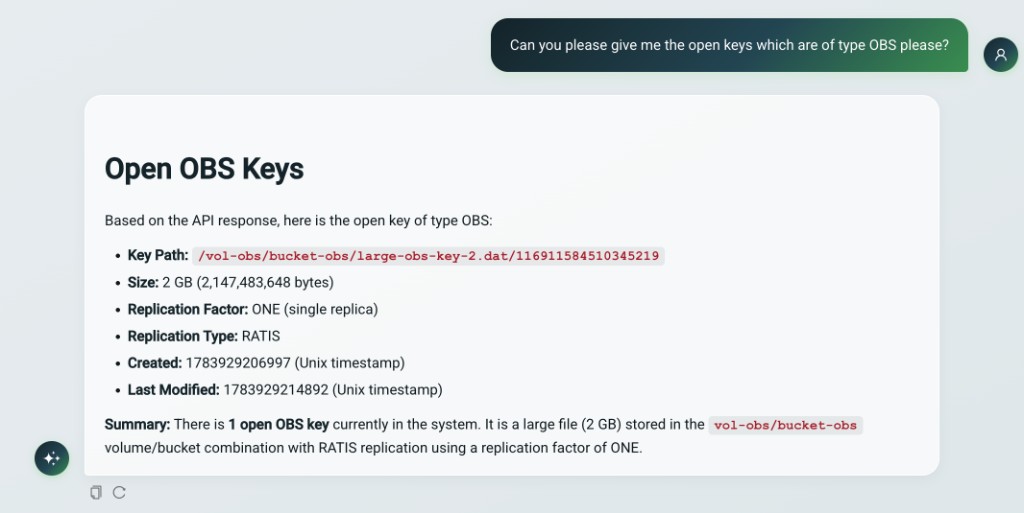
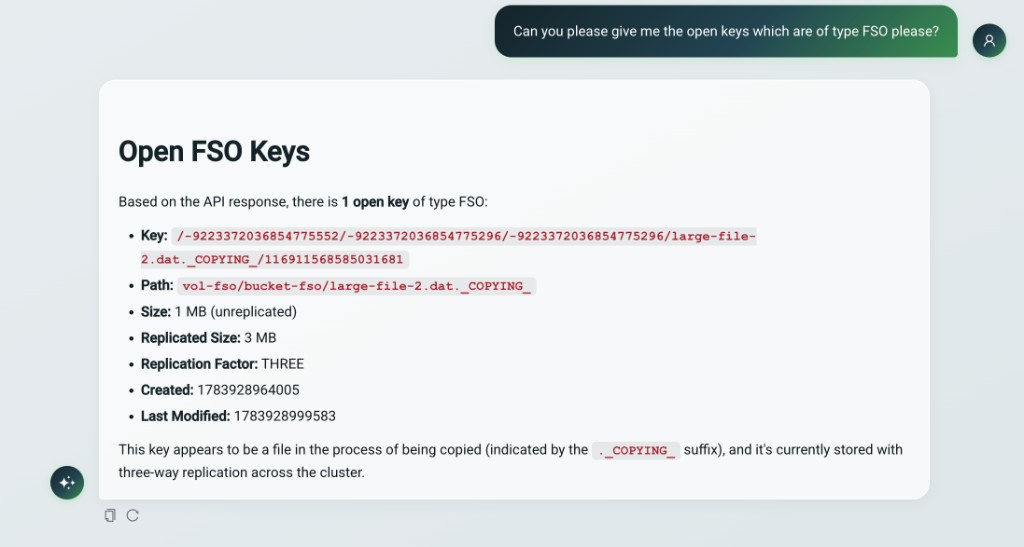
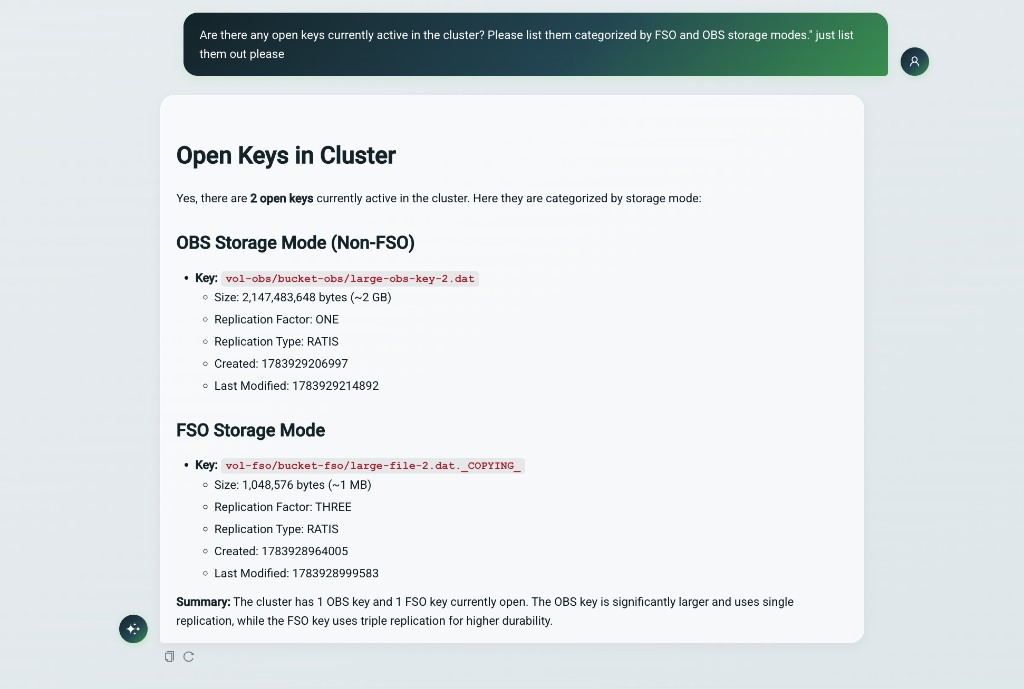
Tip: Name the volume and bucket, and say "open" when you mean uncommitted keys. FSO/OBS is a bucket layout, not a key state - "FSO keys" means committed keys in an FSO bucket, while "open FSO keys" means uncommitted keys.
Example: Filtering by Storage Mode
You can ask the assistant to filter results based on the storage mode (OBS or FSO). For example, you can request only the open keys of type OBS:
Or request only the open keys of type FSO:
You can also ask the assistant to list all open keys and categorize them by their storage mode:
10. Tool (endpoint) reference
These are the Recon views the assistant can call. This list mirrors the in-code catalog (see Extending).
| Group | Tool | Answers |
|---|---|---|
| Cluster | api_v1_clusterState | Overall cluster snapshot (capacity, counts, health). |
| Cluster | api_v1_datanodes | Datanode inventory and health. |
| Cluster | api_v1_pipelines | Pipeline inventory, leaders, members, state. |
| Containers | api_v1_containers | General container inventory. |
| Containers | api_v1_containers_missing | Missing / lost containers. |
| Containers | api_v1_containers_unhealthy | All unhealthy containers (aggregate). |
| Containers | api_v1_containers_unhealthy_state | Unhealthy containers filtered to one state. |
| Containers | api_v1_containers_deleted | Containers deleted in SCM. |
| Containers | api_v1_containers_mismatch | OM/SCM existence mismatches. |
| Containers | api_v1_containers_mismatch_deleted | Deleted in SCM but still present in OM. |
| Containers | api_v1_containers_quasiClosed | Quasi-closed containers. |
| Containers | api_v1_containers_unhealthy_export | Export jobs for unhealthy-container data. |
| Keys | api_v1_keys_open | Open / uncommitted keys (detailed). |
| Keys | api_v1_keys_open_summary | Open-key totals. |
| Keys | api_v1_keys_open_mpu_summary | Open multipart-upload totals. |
| Keys | api_v1_keys_deletePending | Keys pending deletion (detailed). |
| Keys | api_v1_keys_deletePending_summary | Pending-delete key totals. |
| Keys | api_v1_keys_deletePending_dirs | Directories pending deletion. |
| Keys | api_v1_keys_deletePending_dirs_summary | Pending-delete directory totals. |
| Keys | api_v1_keys_listKeys | Committed key/file listing and filtering. |
| Namespace | api_v1_volumes | Volume inventory. |
| Namespace | api_v1_buckets | Bucket inventory (optionally by volume). |
| Namespace | api_v1_namespace_summary | Object counts under a path. |
| Namespace | api_v1_namespace_usage | Disk usage for a path. |
| Namespace | api_v1_namespace_quota | Quota limit vs. usage for a path. |
| Namespace | api_v1_namespace_dist | File-size distribution under a path. |
| Utilization | api_v1_utilization_fileCount | File-count distribution by size tier. |
| Utilization | api_v1_utilization_containerCount | Container-count distribution by size tier. |
| Tasks | api_v1_task_status | Recon background task and sync status. |
11. Limits & boundary conditions
The assistant is a bounded, read-only summarizer - not a query engine. Keep these in mind when interpreting answers:
- At most 1000 records per read, no pagination. Answers are a sample / first page, not the full dataset. Narrow the scope (path prefix, filters) to see more.
- Not randomized. A request for a "random sample" returns the first page and is presented as a sample, not a true random draw.
- Not a computing engine. It reports what endpoints return; it does not run ad-hoc aggregations, joins, or math across the cluster.
- Safe-scope for key listings. When
exec.require.safe.scopeis enabled (default), listing keys requires a bucket-scoped prefix (/<volume>/<bucket>or deeper), preventing full-cluster scans. - Sync freshness. Answers reflect Recon's last successful OM/SCM metadata sync, not the live
cluster. Recon syncs on a configurable interval, so very recent changes may not appear yet; ask
about task/sync status (
api_v1_task_status) to gauge freshness. - Bounded concurrency and time. Requests beyond pool + queue capacity get HTTP 503; requests
exceeding
request.timeout.msget HTTP 504. - No conversation memory. Each query is independent - the assistant does not retain context from previous questions in the same session. If a follow-up question relies on a prior answer, repeat the relevant detail in the new query.
- Honest answers. Truncation, empty results, and sampling are called out in the response text.
12. REST API endpoints
The assistant is exposed under /api/v1/chatbot.
POST /api/v1/chatbot/chat
Request (model, provider, and userId are optional):
{
  "query": "How many datanodes are healthy?",
  "model": "gemini-2.5-flash",
  "provider": "gemini",
  "userId": "alice"
}
Response:
{ "response": "...", "success": true }
GET /api/v1/chatbot/health
Always returns HTTP 200 with the current state. llmClientAvailable is true only when the feature
is enabled and at least one provider has a usable API key:
{ "enabled": true, "llmClientAvailable": true }
GET /api/v1/chatbot/models
Returns the model lists for the configured (key-present) providers - exactly what the UI dropdown should offer. The list is empty when no provider is configured:
{ "models": ["gemini-2.5-pro", "gemini-2.5-flash"] }
Status codes
| Code | Meaning |
|---|---|
| 200 | Success. |
| 400 | Empty/blank query. |
| 503 | Feature disabled, or the request queue is full (overloaded). |
| 504 | Request exceeded request.timeout.ms. |
| 500 | Internal error (details are logged, not returned). Also returned when the resolved provider has no usable key at query time - for example a JCEKS key that cannot be read - and no other provider is configured. Check GET /api/v1/chatbot/health. |
The userId is masked in logs so identities are not leaked.
13. Security model
Defenses are layered so that even a fully prompt-injected model cannot make Recon do anything unsafe:
- Prompt-level - the model is told the user message is untrusted and to ignore embedded instructions.
- Allowlist - only the registered Recon tools can ever execute.
- Safe-scope - key listings require a bucket-scoped prefix (default).
- Record cap - every read is capped at 1000 records.
- Credential isolation - API keys are resolved server-side (see Managing API keys); never per request.
- Resource bounds - a bounded thread pool, queue, and per-request timeout.
- Read-only - by construction, the assistant only reads Recon metadata.
See also Data sent to third-party providers for the data-egress considerations.
14. Extending the assistant for new Recon features
The assistant is built to grow with Recon:
- Tunable semantics live in resources (the prompt files) and can be edited without recompiling.
- The tool catalog lives in code as a small, reviewed set.
To expose a new Recon endpoint to the assistant:
- Add it to the in-code catalog - a tool spec (name, description, parameters), an allowlist entry, and a router case that calls the Recon bean.
- Document its semantics in
recon-tool-semantics.mdso the model knows when to choose it.
An automated consistency test keeps the catalog, allowlist, and router in sync - adding a tool in only one place fails the build.
Note: Do not hand-edit the tuned prompt wording. The shipped prompts are tuned for Recon; extend the semantic guide for new tools, but otherwise leave the prompts as they are.
15. Prompt & resource files
The editable prompt resources live in hadoop-ozone/recon/src/main/resources/chatbot/:
| File | Role |
|---|---|
recon-tool-selection-prompt-preamble.txt | Tool-selection rules and prompt-injection defense. |
recon-tool-semantics.md | The per-tool semantic guide. Extend this when adding a tool. |
recon-summarization-prompt.txt | Rules for formatting the final answer. |
recon-fallback-prompt-template.txt | Reply used when no tool fits / off-topic questions. |
The shipped versions are tuned for Recon - change them deliberately.
16. Troubleshooting & operations
| Symptom | Likely cause / fix |
|---|---|
Empty answer from a reasoning model (e.g. gemini-2.5-pro) | The model spent its token budget "thinking". Prefer a fast model (flash), or raise token limits. |
| Answered by an unexpected model/provider | Routing fallback - the requested provider/model was not configured. See routing. |
| "No API key configured" | Check the provider, the key, and hadoop.security.credential.provider.path. |
llmClientAvailable: false after enabling JCEKS | Wrong/missing keystore password (HADOOP_CREDSTORE_PASSWORD or the password file), or the alias name does not match the config key. A bad password makes all aliases in that keystore unreadable. |
Chat works but you expected JCEKS to be in use | A plaintext *.api.key is still present and is used as fallback. Remove it; confirm ozone getconf returns empty for the key. |
| HTTP 504 (timeout) / HTTP 503 (overloaded) | Tune thread.pool.size, max.queue.size, request.timeout.ms. |
| Stale answers | Recon sync lag - answers reflect the last sync. Check api_v1_task_status. |
| Egress / connection failures | Firewall, proxy, or *.base.url. See Prerequisites & egress. |
Logs record request lifecycle and token counts but not the query text or any secrets.